Tag: MPE

A man in a recording studio sits behind a keyboard and modular synthesizers, holding a small device and gesturing as he speaks. A computer screen with music software is visible on his right.

Expressive E Explains MPE

MIDI Association members Expressive E, makers of the Osmose keyboard and the Touché Controller have released a video explaining the benefits of MPE.

What is MPE (Midi Polyphonic Expression)? How will it change how you play synths and synthesizers forever?

Watch film composer @JOSHMADOFF finally break down this fantastic technology in an approachable and musical way.

Yes, you will finally understand how MPE works and what it does for your music! In the episode #8 of our Creative Tutorials series, Josh will go over the history of keyboard instruments, their somewhat complex relationship to “musical expression” and how MPE changes the game for all musicians.

Ultimately you’ll realise that with our MPE synth Osmose, our MPE plugins and all other manufacturers’ instruments from the MPE family, you can produce more expressive music with less programming!

00:00 Intro
00:15 What does MPE mean?
00:28 A simplified history of the keyboard
02:00 Hear MPE in action
02:43 MIDI vs MPE
04:15 MPE & software synths
05:54 MPE & hardware synths
07:42 Discovering the MPE arpeggiator
08:40 Creating an MPE super synth
09:52 Different kinds of MPE instruments
11:25 MPE playing examples
12:55 The benefits of MPE
A bold, black mathematical symbol representing there exists (∃), shown in a simple, sans-serif style on a white background.

Expressive E


Introducing GeoShred Studio

GeoShred Studio for MacOS Released

GeoShred introduces a new paradigm for musical instruments, offering fluid expressiveness through a performance surface featuring the innovative “Almost Magic” pitch rounding. This cutting-edge software combines a unique performance interface with physics-based models of effects and musical instruments, creating a powerful tool for musicians. Originally designed for iOS devices, GeoShred is now available as an AUv3 plug-in for desktop DAWs, expanding its reach and integration into professional music production workflows.

GeoShred Studio, an AUv3 plug-in, runs seamlessly on macOS devices. Paired with GeoShredConnect, musicians can establish a MIDI/MPE connection between their iOS device running GeoShred and GeoShred Studio, enabling them to incorporate GeoShred’s expressive multi-dimensional control into their desktop production setup. This connection allows users to perform and record tracks from their iOS device as MIDI/MPE, which can be further refined and edited in the production process.

iCloud integration ensures that preset edits are synchronized between the iOS and macOS versions of GeoShred. For example, a preset saved on the iOS version of GeoShred automatically syncs with GeoShred Studio, providing a seamless experience across platforms.

Equipped with a built-in guitar physical model and 22 modeled effects, GeoShred Studio offers an impressive array of sonic possibilities. For those looking to expand their musical palette, an additional 33 physically modeled instruments from around the globe are available as in-app purchases (IAPs). These instruments range from guitars and bowed strings to woodwinds, brass, and traditional Indian and Chinese instruments.

GeoShred Studio is designed to be performed expressively using GeoShred’s isomorphic keyboard.

For users who don’t own the iOS version, the free GeoShred Control MPE controller (https://apps.apple.com/us/app/geoshred-control/id1336247116) is available for use with GeoShred Studio.

GeoShred Studio is also compatible with MPE controllers, conventional MIDI controllers, and even breath controllers, offering a wide range of performance options. GeoShred Studio is free to download, but core functionality requires the purchase of GeoShred Studio Essentials, which includes distinct instruments separate from those in the iOS/iPadOS app, and iOS/iPadOS purchases do not transfer.

Works with MacOS Catalina or greater.

GeoShred, unleash your musical potential!

We are offering a 25% discount on all iOS/iPadOS and MacOS products in celebration of GeoShred 7, valid until October 10, 2024. Pricing table at moforte.com/pricing


A bald man with a long beard passionately plays a keyboard on stage, leaning in close to the instrument. In the background, a guitar shaped like a keyboard is visible. The image is in black and white.

The MPE Profile NAMM 2024

MPE is the bridge between MIDI 1.0 and MIDI 2.0. The new MIDI 2.0 Profile uses bi-directional communication to define exactly what MPE features are supported for an enhanced user experience.

The MIDI-CI Profile for MIDI Polyphonic Expression (MPE) specification makes it possible for artists to perform independent gestures for each musical note, with up to three dimensions of expression. With MPE, every note a musician plays can be articulated individually for much greater expressiveness.

MPE has broad support from many DAWs, Synthesizers and Controllers.

The MIDI-CI Profile for MIDI Polyphonic Expression (MPE) specification defines an MMA/AMEI Recommended Practice for hardware and software manufacturers to communicate multidimensional control data between MIDI controller instruments, synthesizers, digital audio workstations, and other products, using MIDI messages.

The specification describes a recommended way of using individual MIDI Channels to achieve per-note control, enabling richer communication between increasingly expressive MIDI hardware and software.

Join us viewing The MPE Profile NAMM 2024 with a performance by Jordan Rudess.


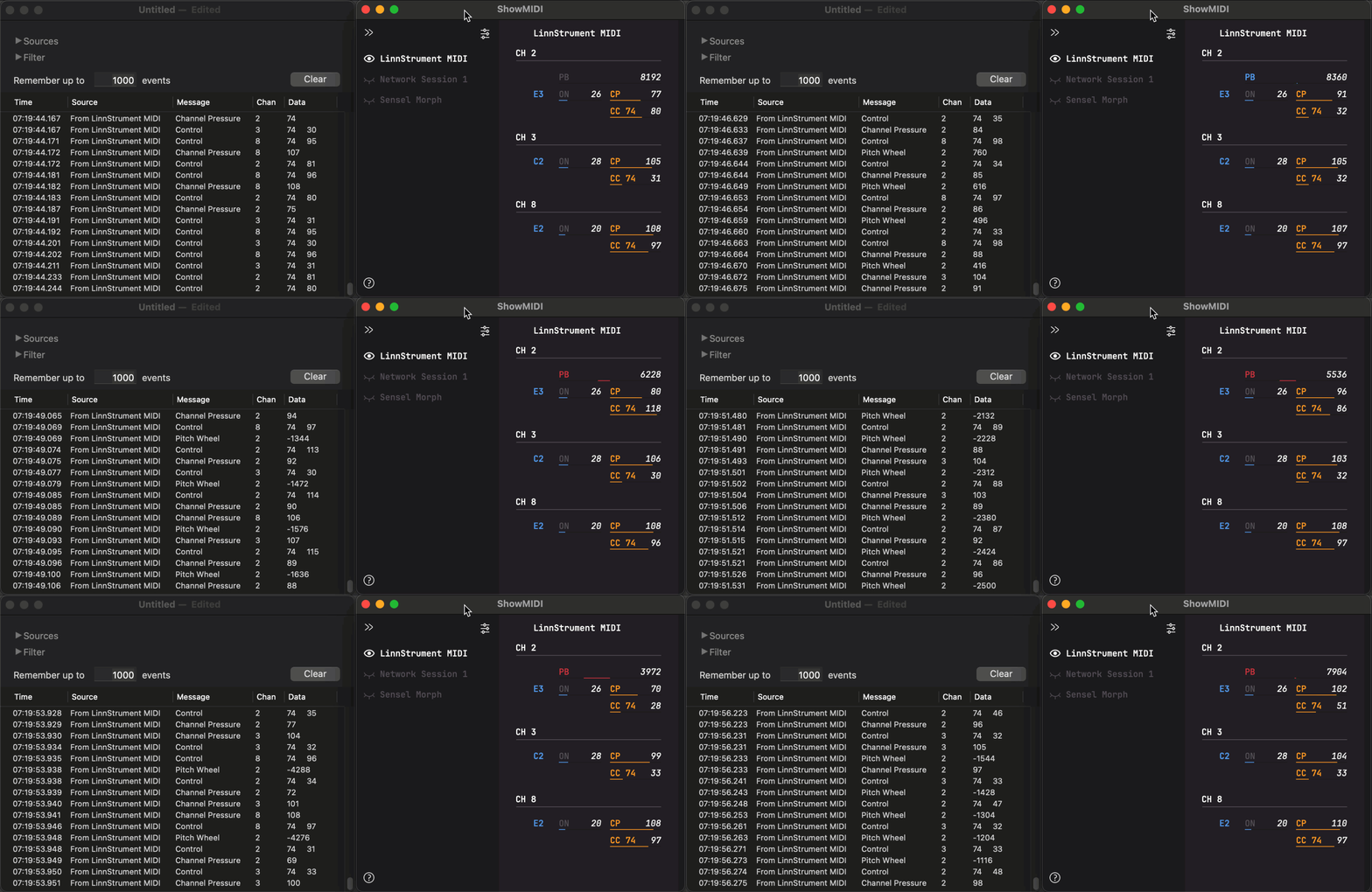
A screenshot of the ShowMIDI app displaying four MIDI devices—LinnStrument MIDI, Seaboard BLOCK, and Sensel Morph—with various channels, pitch bend, aftertouch, note, and control change data.

ShowMIDI: effortlessly visualize MIDI activity


ShowMIDI is a multi-platform GUI application to effortlessly visualize MIDI activity, filling a void in the available MIDI monitoring solutions.

Instead of wading through logs of MIDI messages to correlate relevant ones and identify what is happening, ShowMIDI visualizes the current activity and hides what you don’t care about anymore. It provides you with a real-time glanceable view of all MIDI activity on your computer.

When something happens that you need to analyze in detail, you can press the spacebar to pause the data and see a real-time static snapshot. Once you’re doing, press the spacebar again and ShowMIDI resumes with the latest activity.

This animation shows the difference between a traditional MIDI monitor on the left and ShowMIDI on the right: 


Open-source and multi-platform

ShowMIDI is written in C++ and JUCE for macOS, Windows and Linux, an iOS version is in the works. You can find the source code in the GitHub repository.

Alongside the standalone application, ShowMIDI is also available as VST2, VST3, AUv2, AUv3, CLAP and LV2 plugins for DAWs and hosts that support MIDI effect plugins. This makes it possible to visualize MIDI activity for individual channels and to save these with your session.


Introduction and overview

Below is an introduction video that shows how the standalone version of ShowMIDI works. You get a glimpse of what the impetus for creating this tool was and how you can use it with multiple MIDI devices. Seeing the comparison between traditional MIDI monitor logs (including my ReceiveMIDI tool) and ShowMIDI’s visualization, clearly illustrates how the information becomes much easier to understand and consume.


Smart and getting smarter

ShowMIDI also analyzes the MIDI data and displays compound information, like RPN and NRPN messages that are constituted out of multiple CC messages. RPN 6, which is the MPE configuration message, is also detected and adds MPE modes to the channels that are part of an MPE zone.

This is just the beginning, additional visualizations, smart analysis and interaction modes will continue to be added. As MIDI 2.0 becomes more widely available, ShowMIDI will be able to switch its display mode to take those messages into account too.


White text reading MIDI Polyphonic Expression appears over a purple and blue gradient background with abstract, wavy dotted patterns.

MIDI Polyphonic Expression (MPE) Specification Adopted!

One of the biggest recent developments in MIDI is MIDI Polyphonic Expression (MPE). MPE is a method of using MIDI which enables multidimensional controllers to control multiple parameters of every note within MPE-compatible software. 

In normal MIDI, Channel-wide messages (such as Pitch Bend) are applied to all notes being played on a single MIDI Channel. In MPE, each note is assigned its own MIDI Channel so that those messages can be applied to each note individually.

The newly adopted MIDI Polyphonic Expression (MPE) specification is now available for download by MIDI Association members.


Update Feb. 5 2019 -ROLI launches MPE website 

The ROLI Seaboard GRAND, Seaboard RISE, and BLOCKS – including the Seaboard Block and Lightpad Block – send standard MIDI messages and can be used with any software or hardware instrument that responds to these messages.

To take advantage of the five dimensions of touch the GRAND, RISE, and BLOCKS use MPE – MIDI Polyphonic Expression. This page lists MPE-compatible synthesizers and links to guides on using them with the Seaboard RISE, Seaboard GRAND, and BLOCKS. 

Check out all the information that ROLI has assembled on over 100 products from different companies that support MIDI Polyphonic Expression. 


Update Sept. 14, 2020 -KVR launches MPE forum


MIDI Manufacturers Association (MMA) Adopts New MIDI Polyphonic Expression (MPE) Enhancement to the MIDI Specification 


Los Angeles, CA, January 28, 2018− Today marks the MIDI Manufacturers Association’s (MMA) ratification of a new extension to MIDI, MPE (MIDI Polyphonic Expression). MPE enables electronic instruments such as synthesizers to provide a level of expressiveness typically possible only with acoustic instruments.

Prior to MPE, expressive gestures on synthesizers—such as pitch bending or adding vibrato—affected all notes being played. With MPE, every note a musician plays can be articulated individually for much greater expressiveness.

In MPE, each note is assigned its own MIDI Channel, so that Channel-wide expression messages can be applied to each note individually. Music making products (such as the ROLI Seaboard, Moog’s Animoog, and Apple’s Logic) take advantage of this so that musicians can apply multiple dimensions of finger movement control: left and right, forward and back, downward pressure, and more.

MMA President Tom White notes that “The efforts of the members (companies) of MMA has resulted in a specification for Polyphonic Expression that provides for interoperability among products from different manufacturers, and benefits the entire music industry.”

Jean-Baptiste Thiebaut of ROLI concurs. “The MPE specification paves the way for a new generation of expressive controllers and music software, providing many creative opportunities for live musicians and producers. MPE remains fully compatible with MIDI.”

The MPE specification will be available for download in the coming weeks. To obtain a free copy, join the MIDI Association, the global community of people who work, play and create with MIDI, at www.MIDI.org. 

MPE Press Release Downloadable PDF

The Basic Features of MPE

(Reprinted from the MIDI Manufacturers Association MPE Specification document’s Background Section)
(Note: not all devices may support all features)

The MPE specification aims to provide an agreed method for hardware and software manufacturers to communicate multidimensional control data between MIDI controllers, synthesizers, digital audio workstations, and other products, using the existing framework of MIDI 1.0.

These proposed conventions define a way of distributing polyphonic music over a group of MIDI Channels, making multiple parameters of different notes separately controllable. This will enable richer communication between increasingly expressive MIDI hardware and software.

Briefly, what is defined is as follows:

  — Wherever possible, every sounding note is temporarily assigned its own MIDI Channel between its Note On and Note Off. This allows Control Change and Pitch Bend messages to be addressed to that particular note.

  — A Registered Parameter Number is used to establish the range of Channels used for sending or receiving notes. Two messages control the division of MIDI Channel space into sub-spaces called Zones, so that multi-timbral playing is still possible using only one physical MIDI interface.

  — When there are more active notes in a Zone than available Channels, two or more notes will have to share the same Channel. Under such circumstances, all notes will continue to sound, but will no longer be uniquely controllable.

  — Each Zone has a dedicated extra Channel, called the Master Channel, which conveys common information including Program Change messages, pedal data, and overall Pitch Bend. These messages apply across the entire Zone.

(The MPE specification also defines how to handle Pitch Bend, Aftertouch and CC messages to provide maximum interoperability.)

The full MPE MIDI specification is available for download in the Specs section of the site. 


MPE Live Chat 

On May 26, 2018, we held the very first MIDI Live! chat with a panel of MPE specialists.

We recorded the session and it is presented here as a podcast.

Listeners were not only able to send in questions via text but were able to actually join the discussion and interact directly with the panelists. Roger Linn demoed his Linnstrument live from his studio in Los Altos.

DIscussions included the differences between the original MPE spec and the final MMA specification, MPE checklists, and test sequences, and the requirements for obtaining an MMA MPE logo that is under development.


...

MPE MIDI Live! Chat Podcast –  

On May 26, we held the very MIDI Live! chat with a panel of MPE specialists. We recorded the session and it is presented here as a podcast.

1


Here is a collection of Youtube videos showing off how expressive MPE enabled instruments can be. 


Links to online MPE resources


...

Multidimensional Polyphonic Expression – Synthtopia

Posts about Multidimensional Polyphonic Expression written by synthhead, Elisabeth, and Darwin Grosse


...

Bitwig | The Future of MIDI

Bitwig Studio is a multi-platform music-creation system for production, performance and DJing, with a focus on flexible editing tools and a super-fast workflow.

A black electronic music keyboard with soft, raised keys sits on a wooden desk next to a pencil and lined paper, viewed from above.

Copy of MIDI Polyphonic Expression (MPE) Specification Adopted!


One of the biggest recent developments in MIDI is MIDI Polyphonic Expression (MPE). MPE is a method of using MIDI which enables multidimensional controllers to control multiple parameters of every note within MPE-compatible software. 

In normal MIDI, Channel-wide messages (such as Pitch Bend) are applied to all notes being played on a single MIDI Channel. In MPE, each note is assigned its own MIDI Channel so that those messages can be applied to each note individually.

The newly adopted MIDI Polyphonic Expression (MPE) specification is now available for download By MIDI Association members.


MIDI Manufacturers Association (MMA) Adopts New MIDI Polyphonic Expression (MPE) Enhancement to the MIDI Specification 


Los Angeles, CA, January 28, 2018− Today marks the MIDI Manufacturers Association’s (MMA) ratification of a new extension to MIDI, MPE (MIDI Polyphonic Expression). MPE enables electronic instruments such as synthesizers to provide a level of expressiveness typically possible only with acoustic instruments.

Prior to MPE, expressive gestures on synthesizers—such as pitch bending or adding vibrato—affected all notes being played. With MPE, every note a musician plays can be articulated individually for much greater expressiveness.

In MPE, each note is assigned its own MIDI Channel, so that Channel-wide expression messages can be applied to each note individually. Music making products (such as the ROLI Seaboard, Moog’s Animoog, and Apple’s Logic) take advantage of this so that musicians can apply multiple dimensions of finger movement control: left and right, forward and back, downward pressure, and more.

MMA President Tom White notes that “The efforts of the members (companies) of MMA has resulted in a specification for Polyphonic Expression that provides for interoperability among products from different manufacturers, and benefits the entire music industry.”

Jean-Baptiste Thiebaut of ROLI concurs. “The MPE specification paves the way for a new generation of expressive controllers and music software, providing many creative opportunities for live musicians and producers. MPE remains fully compatible with MIDI.”

The MPE specification will be available for download in the coming weeks. To obtain a free copy, join the MIDI Association, the global community of people who work, play and create with MIDI, at www.MIDI.org. 

MPE Press Release Downloadable PDF


The Basic Features of MPE

(Reprinted from the MIDI Manufacturers Association MPE Specification document’s Background Section)
(Note: not all devices may support all features)

The MPE specification aims to provide an agreed method for hardware and software manufacturers to communicate multidimensional control data between MIDI controllers, synthesizers, digital audio workstations, and other products, using the existing framework of MIDI 1.0.

These proposed conventions define a way of distributing polyphonic music over a group of MIDI Channels, making multiple parameters of different notes separately controllable. This will enable richer communication between increasingly expressive MIDI hardware and software.

Briefly, what is defined is as follows:

  — Wherever possible, every sounding note is temporarily assigned its own MIDI Channel between its Note On and Note Off. This allows Control Change and Pitch Bend messages to be addressed to that particular note.

  — A Registered Parameter Number is used to establish the range of Channels used for sending or receiving notes. Two messages control the division of MIDI Channel space into sub-spaces called Zones, so that multi-timbral playing is still possible using only one physical MIDI interface.

  — When there are more active notes in a Zone than available Channels, two or more notes will have to share the same Channel. Under such circumstances, all notes will continue to sound, but will no longer be uniquely controllable.

  — Each Zone has a dedicated extra Channel, called the Master Channel, which conveys common information including Program Change messages, pedal data, and overall Pitch Bend. These messages apply across the entire Zone.

(The MPE specification also defines how to handle Pitch Bend, Aftertouch and CC messages to provide maximum interoperability.)

The full MPE MIDI specification will be available soon for download in the Specs section of the site. 


Digital
audio workstations (DAWs) 
Company Link
Bitwig 8-Track & Studio Bitwig https://www.bitwig.com/en/home.html
GarageBand
macOS
Apple https://www.apple.com/mac/garageband/
Logic Pro X Apple https://www.apple.com/logic-pro/
Reaper Reaper https://www.reaper.fm
Steinberg
Cubase
Steinberg https://new.steinberg.net/cubase/
Steinberg
Cubasis 2 
Steinberg https://www.steinberg.net/en/products/mobile_apps/cubasis/start.html
Tracktion
Waveform
Steinberg https://www.tracktion.com/products/waveform
Cakewalk BandLab https://www.bandlab.com/products/cakewalk
   
Software synthesizers  Company Link
crusher-x accSone https://www.accsone.com
Poly-Ana Admiral Quality http://www.admiralquality.com/product/poly-ana/
Logic Pro X
Instruments
Apple https://www.apple.com/logic-pro/plugins-and-sounds/
MainStage
Instruments
Apple https://www.apple.com/mainstage/plugins-and-sounds/
Quanta Audio Damage https://www.audiodamage.com/collections/plugin-instruments/products/ad046-quanta
Max (and any
MPE instruments created in Max)
Cycling 74 https://cycling74.com/products/max/
“Play
5″ Sample Engine
East West Sounds http://www.soundsonline.com/Play-Software-Download
Strobe2 Fxpansion https://www.fxpansion.com/products/strobe2/
Cypher 2 Fxpansion https://www.fxpansion.com/products/cypher2/
Sektor Initial Audio https://initialaudio.com/product/sektor/
Audio
SynthMaster
KV331 https://www.kv331audio.com
Aalto Madrona Labs  https://madronalabs.com/products/aalto
Kaivo Madrona Labs  https://madronalabs.com/products/kaivo
Kontakt Native Instruments https://www.native-instruments.com/en/products/komplete/samplers/kontakt-6/
Reaktor (and
any MPE instruments created in Reaktor)
Native Instruments https://www.native-instruments.com/en/products/komplete/synths/reaktor-6/
WaveMapper 2 PPG http://wolfgangpalm.com/wm2.html
WaveGenerator PPG http://wolfgangpalm.com/wg.html
Phonem PPG http://wolfgangpalm.com/phonem.html
Infinate Pro PPG http://wolfgangpalm.com/infinitepro.html
Equator ROLI https://roli.com/products/software/equator-synth
Softube
Modular
Softube https://www.softube.com/index.php?id=modular
Omnisphere Spectrasonics https://www.spectrasonics.net/products/omnisphere/index.php
Trillian Spectrasonics https://www.spectrasonics.net/products/trilian.php
BT Phobos Spitfire Audio https://www.spitfireaudio.com/shop/a-z/bt-phobos/
Addiction
Synth
Stagecraft Software http://www.stagecraftsoftware.com/products/addictionsynth/
Infinity Synth Stagecraft Software http://www.stagecraftsoftware.com/products/infinitysynth/
Cubase (5
instruments)
Steinberg https://new.steinberg.net/cubase/
Kyma 7 Symbolic Sound https://kyma.symbolicsound.com
The Legend Synapse Audio https://www.synapse-audio.com/thelegend.html
Bazille U-He https://u-he.com/products/bazille/
Ace U-He https://u-he.com/products/ace/
Diva U-He https://u-he.com/products/diva/
Hive U-He https://u-he.com/products/hive/
Repro-5 (5
instruments, downloadable sound files)
U-He https://u-he.com/products/repro/
Falcon UVI https://www.uvi.net/falcon.html
Auras Slate and Ash https://slateandash.com/products/auras
HALion Steinberg https://www.steinberg.net/en/products/vst/halion_und_halion_sonic/halion.html
   
Mobile apps  Company Link
GarageBand iOS Apple https://www.apple.com/ios/garageband/
Quanta Audio Damage https://www.audiodamage.com/products/ad046-quanta
SpringSound Ankorage http://www.anckorage.com/spring-sound/
Gestrument Gestrument AB https://gestrument.com
SynthMaster
Player
KV331 Audio https://www.kv331audio.com/synthmasterplayer.aspx
GeoShred moForte Inc (Wizdom) http://www.moforte.com
Minimoog Model
D
Moog https://www.moogmusic.com/products/minimoog-model-d-app
Moog Model 15 Moog https://www.moogmusic.com/products/model-15-app
AniMoog Moog https://www.moogmusic.com/products/animoog
iFretless Bass Blue Mango http://ifretless.com/ifretless.php
Sax Blue Mango http://ifretless.com/ifretless.php
iFretless
Guitar
Blue Mango http://ifretless.com/ifretless.php
Volt Numerical Audio http://numericalaudio.com/volt/
Arctic
ProSynth
One Red Dog Media http://www.onereddog.com.au/arcticpro.html
WaveGenerator PPG http://wolfgangpalm.com/iwg.html
WaveMapper PPG http://wolfgangpalm.com/iwm.html
Phonem PPG http://wolfgangpalm.com/iphonem.html
Infinate PPG http://wolfgangpalm.com/iinfinite.html
NOISE Roli https://noise.fm
Seaboard 5D Roli https://itunes.apple.com/us/app/seaboard-5d/id1173937855?mt=8
ThumbJam Sonosaurus https://thumbjam.com
DrumJam Sonosaurus https://drumjamapp.com
GeoSynthesizer Wizdom http://www.wizdommusic.com/products/geo_synthesizer.html
SampleWiz Wizdom http://www.wizdommusic.com/products/samplewiz.html
Tardigrain HumbleTune http://www.humbletune.com/tardigrain/
Le Sound
Reshape
Le Sound https://lesound.io/product/reshape/
   
Hardware synthesizers and
Controllers
Company Link
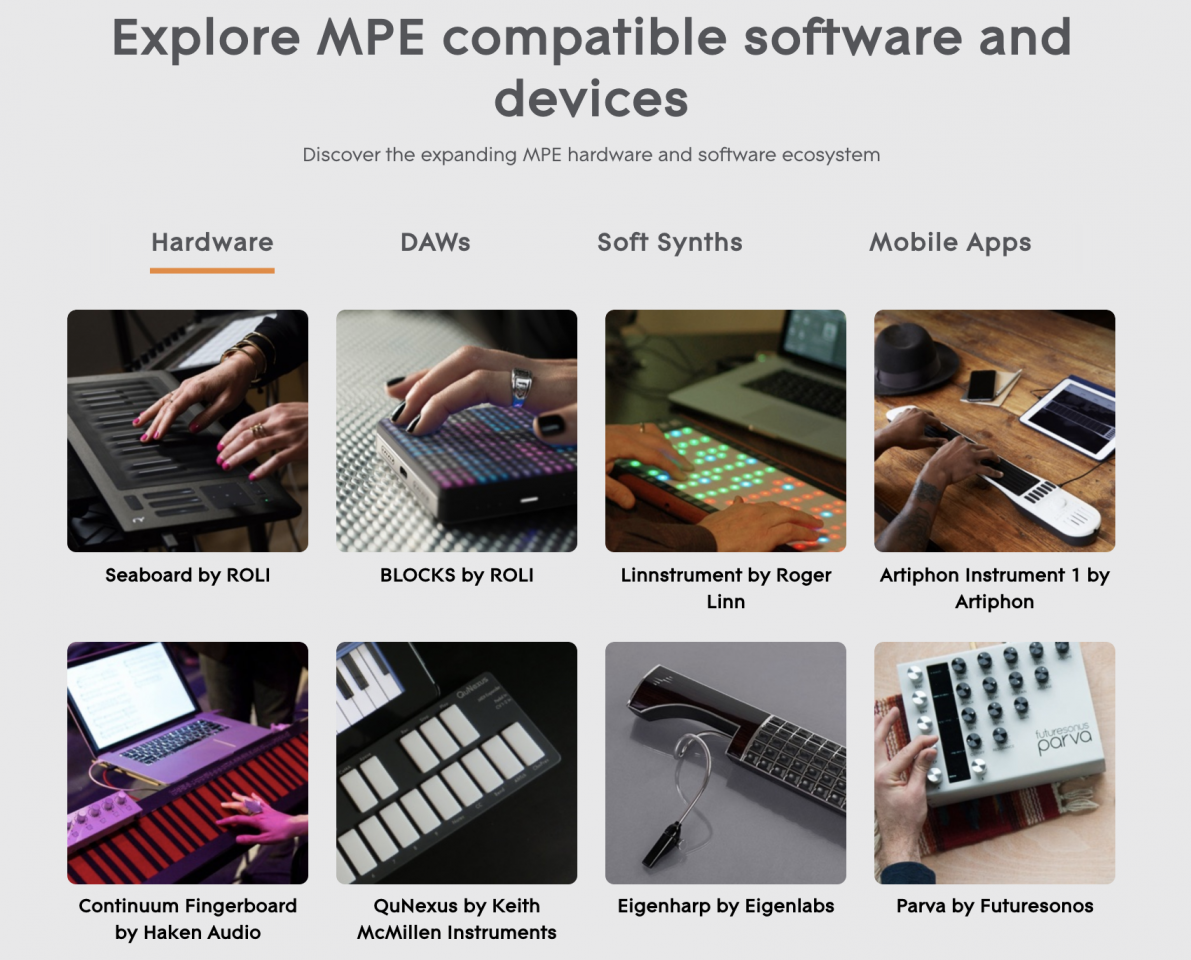
Artiphon INSTRUMENT 1 Artiphon https://artiphon.com/
MicroMonsta Audiothingies https://www.audiothingies.com/product/micromonsta/
Axoloti Axoloti http://www.axoloti.com
Kijimi Black Corporation https://www.deckardsdream.com/product/kijimi-built-preorder-run1
Deckard’s
Dream
Black Corporation https://www.deckardsdream.com
Endorphin.es
Shuttle Control
Endorphin.es http://endorphin.es/endorphin.es–shuttle.html
Expert
Sleepers FH-2
Expert Sleepers http://www.expert-sleepers.co.uk
Futuresonus Parva Futuresonus https://futureson.us
Haken
Continuum
Haken https://www.hakenaudio.com
MOD Duo MOD https://www.moddevices.com
Modal
Electronics 001
Modal Electronics http://www.modalelectronics.com
Modal
Electronics 002
Modal Electronics http://www.modalelectronics.com
Modal
Electronics 002R
Modal Electronics http://www.modalelectronics.com
Modor NF-1
/ NF-1m
Modor http://www.modormusic.com
Polyend Poly Polyend http://polyend.com/product/poly/
Snyderphonics
MantaMate
Snyderphonics https://snyderphonics.com/mantamate.htm
Percussa SSP Percussa https://www.percussa.com
Seaboard Rise
Grand
Roli https://roli.com/products/seaboard
Blocks Roli https://roli.com/products/blocks/
LinnStrument Roger Linn Design http://www.rogerlinndesign.com/linnstrument.html
Expressionist EncoreElectronics http://www.encoreelectronics.com/cont_expres.html
Vermona:
PerFOURmer
Vermona https://www.vermona.com/en/products/synthesizer/product/perfourmer-mkii/
   
These
DAWs and synthesizer plugins can be used with certain MPE Controllers by
following the setup guides provided by the MPE Controller maker:
Company Link
Ableton Live Abelton https://www.ableton.com/en/live/
Audio Modeling
SWAM Engine
Audio Modeling https://audiomodeling.com
Digital
Performer
MOTU http://www.motu.com/products/software/dp/
FL Studio Image Line https://www.image-line.com/flstudio/
iZotope Iris 2 iZotope https://www.izotope.com/en/products/create-and-design/iris.html
Pro Tools Avid https://www.avid.com/pro-tools
Studio One PreSonus https://www.presonus.com/products/Studio-One
Kurzweil
V.A.S.T. Synthesizers
Kurzweil http://www.vintagesynth.com/kurzweil/k2000.php
Roland JV-80
(keyboard)
Roland http://www.vintagesynth.com/roland/jv80.php
Roland  JV-1080 Roland http://www.vintagesynth.com/roland/jv1080.php
Roland Integra
7
Roland https://www.roland.com/us/products/integra-7/
Roland JD-800
(keyboard)
Roland http://www.vintagesynth.com/roland/jd800.php
Roland JD-990
(rack module)
Roland http://www.vintagesynth.com/roland/jd990.php
Roland XP-50 Roland http://www.vintagesynth.com/roland/xp50.php

The following products support one or more of the features of MPE:


Digital audio workstations (DAWs) 

  • Bitwig 8-Track & Studio
  • GarageBand macOS
  • Logic Pro X
  • Reaper
  • Steinberg Cubase
  • Steinberg Cubasis 2.6
  • Tracktion Waveform

Software synthesizers 

  • Admiral Quality Poly-Ana
  • Cycling ’74 Max
  • Equator / Equator Player
  • FXpansion Strobe2
  • KV331 Audio SynthMaster
  • Madrona Labs Aalto
  • Madrona Labs Kaivo
  • MainStage
  • Native Instruments Reaktor
  • Softube Modular
  • Spitfire BT Phobos
  • Stagecraft Addiction and Infinity
  • Symbolic Sound Kyma
  • UVI Falcon
Mobile apps 
  • NOISE
  • Seaboard 5D
  • GeoShred
  • GarageBand iOS
  • Moog Model 15
  • AniMoog

Hardware synthesizers 

  • Artiphon INSTRUMENT 1
  • Audiothingies MicroMonsta
  • Axoloti
  • Deckard’s Dream
  • Endorphin.es Shuttle Control
  • Expert Sleepers FH-1
  • Futuresonus Parva
  • Haken Continuum
  • MOD Duo
  • Modal Electronics 001 / 002 / 002R
  • Modor NF-1 / NF-1m
  • Polyend Poly
  • Snyderphonics MantaMate

These DAWs and synthesizer plugins can be used with certain MPE Controllers by following the setup guides provided by the MPE Controller maker:

  • Ableton Live
  • Audio Modeling SWAM Engine
  • Digital Performer
  • FL Studio
  • iZotope Iris 2
  • Native Instruments Kontakt
  • Pro Tools
  • Spectrasonics Omnisphere and Trillian
  • Studio One
  • U-he Diva
  • Le Sound Reshape

    MPE Live Chat 

    On May 26, 2018, we held the very first MIDI Live! chat with a panel of MPE specialists.

    We recorded the session and it is presented here as a podcast.

    Listeners were not only able to send in questions via text but were able to actually join the discussion and interact directly with the panelists. Roger Linn demoed his Linnstrument live from his studio in Los Altos.

    DIscussions included the differences between the original MPE spec and the final MMA specification, MPE checklists, and test sequences, and the requirements for obtaining an MMA MPE logo that is under development.


    ...

    MPE MIDI Live! Chat Podcast –  

    On May 26, we held the very MIDI Live! chat with a panel of MPE specialists. We recorded the session and it is presented here as a podcast.

    1


    Here is a collection of Youtube videos showing off how expressive MPE enabled instruments can be. 


    Links to online MPE resources


    ...

    Multidimensional Polyphonic Expression – Synthtopia

    Posts about Multidimensional Polyphonic Expression written by synthhead, Elisabeth, and Darwin Grosse


    ...

    Bitwig | The Future of MIDI

    Bitwig Studio is a multi-platform music-creation system for production, performance and DJing, with a focus on flexible editing tools and a super-fast workflow.

    A hand uses a stylus to write or edit sheet music on a tablet screen displaying music notation software. The music score on the screen is titled Welcome to StaffPad.

    MIDI and the Surface Pen

    Pens and stylus’ have been employed as computer interaction devices for quite some time now. Most commonly they were used along with peripheral graphics tablets to give a more natural flow to the artist or designer than a mouse could muster. With the release of the Surface Pro hybrid laptop by Microsoft in 2012 they brought a digital pen along to party that could work directly on the screen. It was intended to bridge the gap between the demands of desktop software and the tablet touch screen form factor. In a mouse and track-pad free computing environment how better to access the finer details that your thick fingertips couldn’t manage. 

    The advantages for the artist become quickly apparent. As the Surface Pro has evolved the graphical power has gotten to the point where it’s a completely competent sketching, drawing and design platform. But there’s another group of artists for whom the digital pen has an awful lot of potential, and that’s the musician. 

    This is probably most joyously demonstrated by the Windows 10 app Staffpad. Staffpad takes the idea of writing music completely literally and presents you with a blank sheet of manuscript paper and asks you to start writing. Combining the digital pen with hand writing recognition Staffpad is able to interpret your hand written notes into digital MIDI information directly onto a score. It can then be played back through a virtual orchestra. It’s a stunning piece of work and remarkably fluid and creative to use. 

    Most of us approach music creation in a more sequenced format. The pen has a lot to offer here as well. Entering notes into a piano roll immediately comes to mind, as does the editing of notes, the trimming of clips or moving blocks in an arrangement. Consider drawing in track automation, with a pen rather than a mouse. How much more fluid and natural could that be?

    In many ways the pen feels like it’s simply replacing the actions of a mouse – but it doesn’t quite work like that. The Surface Pen works through a combination of technology in the pen and a layer of corresponding technology on the screen. It’s not just touch-screen technology, you can’t take the Surface Pen and use it on another brand of screen, it will only work on Surface products. While that affords the technology a great deal of power it can also trip up software that isn’t able to interpret the technology properly. In many cases the pen works just like a mouse replacement, but in others it can cause weird or no behaviour at all.

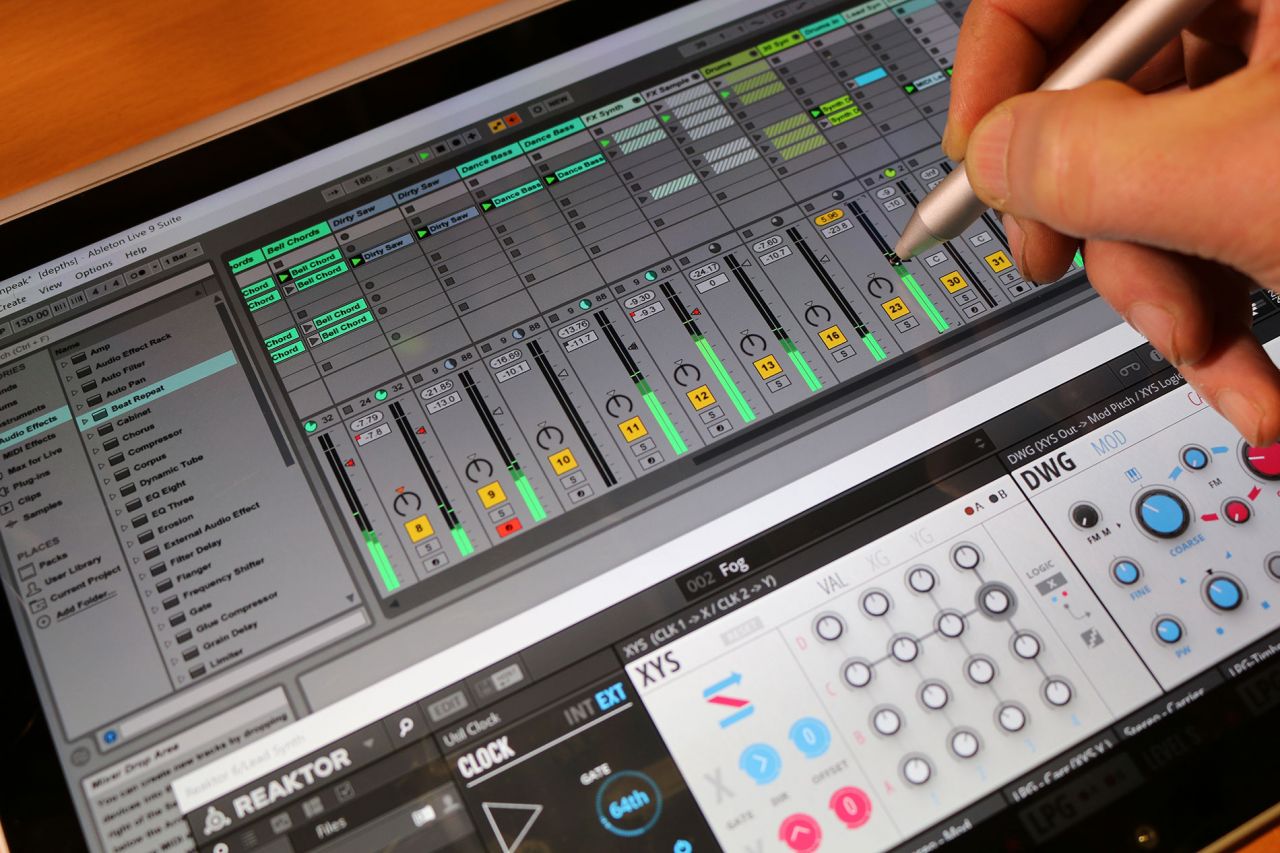
    When PreSonus first released their new touch-enabled version 3 of Studio One the reaction to the Surface Pen when running on the Surface Pro 3 was to get quickly confused and then lock up. In Cakewalk Sonar, again touch-enabled, there were areas in the software that completely refused to acknowledge the presence of a pen on the screen. Both of those DAWs have far better support for it now. Ableton Live appeared to work with both touch and the pen without any trouble except that when grabbing a fader or knob control the value would leap between the maximum and minimum making it impossible to set it accurately. Adding support for “AbsoluteMouseMode” in a preferences file cured that particular oddity. 

    Where it’s been most unflinchingly successful is within Steinberg’s Cubase and Avid’s Pro Tools neither of which has expressed any interest in touch or pen interaction – but it simply works anyway. From entering and editing notes to drawing in long wiggly lines of modulation and automation the pen becomes a very expressive tool.

    However, for the full immersion that the pen can offer, this tends to mean eschewing the keyboard. When you are leaned in, as I mentioned earlier, having to then pull back to use a keyboard shortcut can be rather jarring and interrupting to your workflow. There’s a certain amount you can do with the on-screen virtual keyboard but it can completely cover what it is you’re trying to edit, so it’s not ideal. This highlights what I see as being the current flaw in the Surface Pen workflow – the lack of a relevant, customisable toolbar.

    When editing notes or an arrangement with the pen the ability to do simple tasks such as copy and paste become cumbersome. You can evoke a right-click with the squeeze of a button and then select these task from the list, or you can glide through the menu system but neither of these options are as elegant as a simple Ctrl-C and Ctrl-V. You can quickly extend that to other actions – opening the editor, or the mixer, duplicating, setting loop points there’s a whole raft of commands that are hidden away behind menus or keyboard shortcuts that are annoying to reach with just the pen for input. Adding a simple macro toolbar with user definable keyboard shortcuts would greatly enhance the pen’s workflow. It’s possible to do this with third party applications but it really needs support at the OS level.

    This is something Dell have considered with their Canvas touch-screen and digital pen system. They have incorporated floating “palettes” that are little toolbars to access useful keyboard shortcuts. Some DAWs, such as Bitwig Studio and PreSonus Studio One, have fingerable toolbars that can perform a similar function – but something more global would be helpful.

    With the release of the Surface Pro (2017) Microsoft have introduced an improved Surface Pen with 4 times the resolution of the previous version. Although more relevant to the artist who draws, it’s interesting to see pen support improving in many DAWs. It’s usefulness is becoming more apparent and if you consider the Dell Canvas and the iPad Pro Pencil, along with the development of the Surface into the larger Surface Studio and laptop form factors, it’s also becoming more widespread.

    At the time of writing only one DAW manufacturer has stepped up to push the digital pen into more than just emulating mouse tasks. Bitwig Studio has some special MPE (Multidimensional Polyphony Expression) functionality that allows you to map the pen pressure to parameters on MPE compatible virtual instruments. More on that in another article, but hopefully more creative uses will emerge as this gains popularity.

    The digital pen offers many creative opportunities. It unhinges you from the mouse/keyboard paradigm and pushes you into a more natural and fluid way of working. It lacks support in some software and there’s some work to be done on optimising the workflow by combining it with a toolbar, but it offers a different and creative approach to musical computer interaction.

    Here’s a video of me reviewing the Microsoft Surface Book for music production which has a lot of pen use and examples in it. There’s plenty more on the YouTube channel: