

MultitrackStudio from Bremmers Audio Design is an audio and MIDI multitrack recording application for Windows and Mac that turns a computer into a digital multitrack music recording studio. It supports both “one man band” home recording, where tracks are added one at a time, and live multitrack recording, where multiple tracks can be recorded simultaneously.
What makes MultitrackStudio especially interesting for the MIDI community is its deep and practical implementation of MIDI 2.0. Rather than treating MIDI 2.0 as a future-facing checkbox, MultitrackStudio uses it across real music-production workflows: MIDI input and output devices, per-note expression, MIDI-CI, MIDI 2.0 Profiles, MIDI Clip Files, software instruments, plugins, and external MIDI hardware.
A Familiar Multitrack Studio With Modern MIDI Capabilities
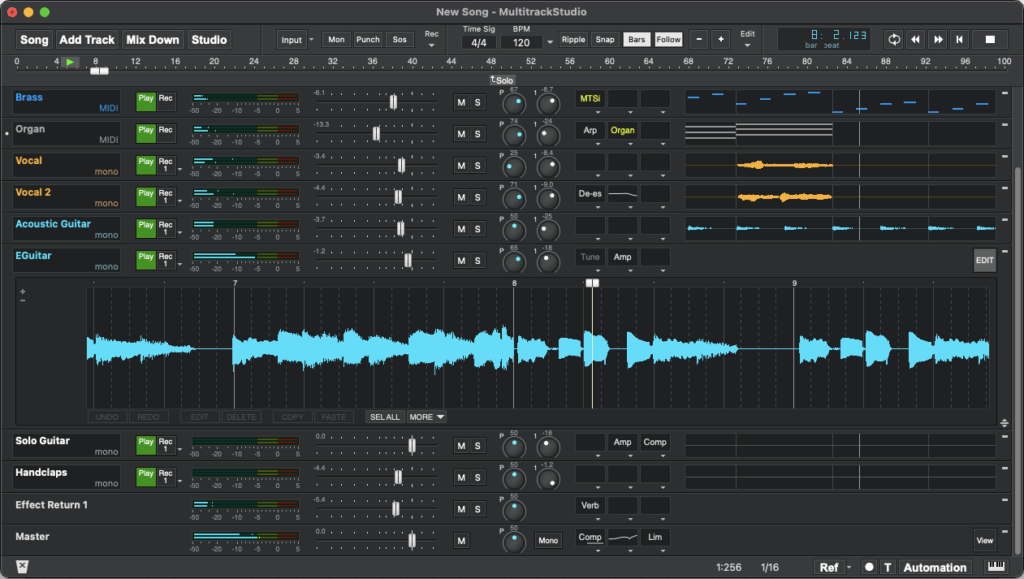
MultitrackStudio has a straightforward recording-studio-style interface designed around audio and MIDI tracks, transport controls, mixer sections, effect slots, instrument slots, and track editors. Users can record audio or MIDI, edit tracks, apply effects, use software instruments, and mix down to a stereo master file.
The program includes built-in effects and a General MIDI-compatible instrument set called MultitrackStudio Instruments, while also supporting plugin formats including AU on Mac, CLAP, VST2, and VST3. This gives users a bridge between traditional recording workflows and newer MIDI 2.0-capable instruments and plugins.
MultitrackStudio Feature Highlights
MultitrackStudio combines audio recording, MIDI sequencing, mixing, editing, software instruments, effects, and modern MIDI 2.0 support in a single Windows and Mac application. Its feature set is designed for musicians who want a straightforward multitrack recording environment without giving up advanced production tools.
Record New Tracks While Playing Along With Existing Ones
- Record alternate takes quickly with a single key press.
- Record audio tracks in mono or stereo.
- Record MIDI tracks alongside audio tracks.
- Use loop recording to capture multiple takes automatically.
- Use VariSpeed to change the pitch of the song to match an instrument, available in the Pro edition.
Mix the Tracks
- Use an unlimited number of groups and effect send/return sections.
- Route Group or Effect Return sections to soundcard outputs in the Pro edition.
- Automate mixer and effect settings in the Pro edition.
- Use Song Versions to store and recall different mixes.
Enhance the Mix With Real-Time Effects
- Use more than 25 built-in high-quality audio effects.
- Use AU plugins on Mac, plus CLAP and VST plugins.
- Add, move, or remove effects while working.
- Use powerful effect sidechaining options in the Pro edition.
List of Included Effects
- Auto Wah
- Automated Fader
- Band Effect
- Chorus
- Compressor
- Convolutor
- Deesser
- Doubler
- Dynamics
- Echo
- EQ
- Exciter
- Flanger
- Guitar Amp
- Master Limiter
- Mid/Side Effect (Pro)
- Multi Effect
- Multiband Compressor (Pro)
- Noise Gate
- Parallel Effect
- Phase Inverter
- Phaser
- Reverb
- Rotor
- Saturator
- Stereo Effect
- Stereo Imager
- Transposer
- Tremolo
- Tuner
- Vibrato
- Vocal Tuner
- AU Plugins
- CLAP Plugins
- VST Plugins
Use MIDI to Play Instruments
- Use MultitrackStudio Instruments, a General MIDI-compatible instrument collection.
- Use third-party AU instrument plugins on Mac, plus CLAP and VSTi instrument plugins.
- Control external synthesizers or a soundcard’s built-in synth.
- Record expressive performances using MPE or MIDI 2.0 keyboards.
Correct Mistakes and Refine Performances
- Use punch-in and punch-out recording.
- Edit audio non-destructively.
- Edit MIDI with pianoroll, notation, drum, and controller editors.
- Use unlimited levels of undo.
Touchscreen and Pen Support
On Windows, MultitrackStudio includes touchscreen support for users who want to work without relying on a mouse and keyboard. Multi-touch is supported, especially in the onscreen MIDI keyboard, and the software is optimized for pen use with or without a touchscreen.
- Full touchscreen support on Windows.
- Multi-touch support for performance-oriented controls such as the onscreen MIDI keyboard.
- Support for Windows 10 and Windows 11 tablets.
- Pen-optimized operation.
Easy to Use
- Includes an assistant for basic tasks.
- Includes context-sensitive help: point to an item and press F1 on Windows or Shift-Command-? on Mac.
- User interface available in English, German, or Dutch.
- Designed to be fast and reliable.
For a complete feature overview, visit the official MultitrackStudio features page.
MIDI 2.0 Protocol Support for MIDI Input and Output
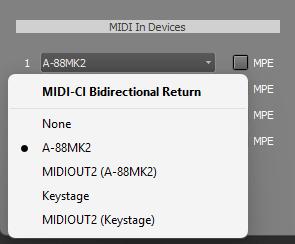
MultitrackStudio supports the MIDI 2.0 protocol for MIDI input devices and MIDI output devices. When a MIDI Out device supports MIDI 2.0, MultitrackStudio can use MIDI 2.0’s higher-resolution data, including 16-bit note velocities, 32-bit controls, and per-note controls.
For musicians and developers, this is important because MIDI 2.0 allows much more detailed performance data than MIDI 1.0. A performance can include higher-resolution velocity, more detailed continuous control, and expressive per-note control, allowing individual notes in a chord to bend, brighten, fade, or respond independently.
Per-Note Expression and MPE Workflows
MultitrackStudio supports per-note controllers and per-note pitch bend. MIDI 1.0 data from an MPE keyboard can be converted to MIDI 2.0-style per-note controls, making it possible to work with modern expressive controllers even when devices and plugins use different formats.
The MultitrackStudio Instruments, Sampler, and Matrix Sampler support selected per-note controls. Per-note controls can also be sent to AU, CLAP, and VST plugins using the best available method, including MIDI 2.0 protocol messages, plugin note expressions, or MPE.
This flexible approach matters because the transition from MIDI 1.0 and MPE to MIDI 2.0 will not happen all at once. MultitrackStudio helps users work across that transition by translating expressive performance data into the most appropriate format for each instrument or plugin.
MIDI 2.0 Clip File Support
MultitrackStudio also supports the MIDI Clip File format, using the .midi2 file extension. MIDI Clip Files are designed to store MIDI 2.0 data, including information that standard MIDI 1.0 files were not designed to preserve.
In MultitrackStudio, MIDI Clip Files can be imported using Add Track → Import Audio/MIDI File. MIDI tracks can be exported to MIDI Clip Files using Song → Export → Export MIDI Tracks, and selected parts from the MIDI track editor can also be exported as MIDI Clip Files.
Imported MIDI Clip Files can contain either MIDI 1.0 or MIDI 2.0 protocol data. Exported MIDI Clip Files use the MIDI 2.0 protocol, helping preserve modern performance information when exchanging musical material.
MIDI 2.0
.midi2 files can’t be opened directly in a track. If you import one, it will be converted to a .mid file. The MIDI 2.0 information is retained (see below). Exporting to .midi2 is available in the MIDI Export window and in track editors.
Under the hood
MultitrackStudio stores MIDI 2.0 per-note controls in MIDI 1.0 files as NRPN values. Any software other than MultitrackStudio won’t recognize the per-note control values in exported MIDI files, but it will still load the files.
The higher MIDI 2.0 resolutions (16 bits for velocity, 32 bits for controllers, etc.) are preserved in .mid files used in tracks as well, again using NRPN parameters. The high resolutions do not appear in exported .MID files, unlike per-note controls.
MIDI-CI: Profiles and Property Exchange
MultitrackStudio supports MIDI-CI, which is part of MIDI 2.0. MIDI-CI allows a sender to retrieve information from a receiver. In MultitrackStudio, MIDI-CI can be used to retrieve program names and controller names from MIDI Out devices that support it.
This means that, when connected to compatible devices, MultitrackStudio can automatically use information supplied by the device instead of relying only on static patchmap files. For users, this can make external MIDI hardware easier to understand and control. For manufacturers, it demonstrates how MIDI-CI can make products more discoverable and easier to integrate into music-production systems.
MultitrackStudio supports MIDI-CI Profiles and Property Exchange. On Windows, MIDI-CI support for MIDI Out devices requires the Windows MIDI Services Runtime.
Under the hood
The part of MIDI-CI used is called Property Exchange. The ResourceList, ChannelList, ProgramList, ChCtrlList, and Korg’s X-ParameterList resources are used. MultitrackStudio subscribes to the ChannelList resource, so it gets notified when something changes.
Support for MIDI 2.0 Profiles
MultitrackStudio supports several MIDI 2.0 Profiles, including:
- Orchestral Articulation Profile for External MIDI Instruments and CLAP plugins
- Piano Profile for MultitrackStudio Instruments acoustic pianos, External MIDI Instruments, CLAP plugins, and VST3 plugins
- Drawbar Organ Profile for MultitrackStudio Instruments, Wheel Organ, External MIDI Instruments, CLAP plugins, and VST3 plugins
- Rotary Speaker Profile for MultitrackStudio Instruments and Wheel Organ using the Rotor effect, External MIDI Instruments, CLAP plugins, and VST3 plugins
- Default Drum Note Map Profile for MultitrackStudio Instruments drums, External MIDI Instruments, and CLAP plugins
These profiles demonstrate one of the key promises of MIDI 2.0: making musical devices, instruments, and software more self-describing and more interoperable. Instead of every product requiring a different custom setup, a profile can define expected behavior for a particular type of instrument or musical function.
Piano Profile Support
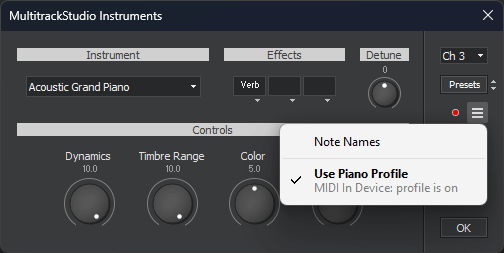
The MultitrackStudio Instruments acoustic pianos support the MIDI 2.0 Piano Profile. MultitrackStudio also supports the Piano Profile for External MIDI Instruments, CLAP plugins, and VST3 plugins.
In MultitrackStudio, the Piano Profile can be enabled or disabled to switch velocity and sustain pedal curves. This is an important real-world example of how MIDI 2.0 Profiles can help improve musical consistency across instruments, controllers, and software.
Orchestral Articulations and MIDI 2.0 Note Attributes
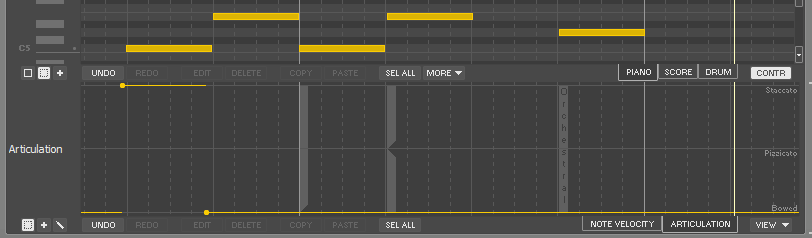
MultitrackStudio includes extensive support for articulations. Users can define articulations using program changes, MIDI channels, keyswitches, or MIDI 2.0 orchestral articulations.
The MIDI 2.0 Note On Orchestral Articulation Profile provides a standardized way to represent articulations as part of the note itself. This can make it easier to exchange data between instruments and sample libraries without losing articulation information.
MultitrackStudio can use MIDI 2.0 note-on attributes for per-note articulation settings in the Note Editor and Multi Note Editor. Orchestral articulations can be selected directly, and .midi2 files can preserve articulation information in ways that are difficult or impossible with traditional MIDI 1.0 files.
CLAP, VST3, AU, and MIDI 2.0
MultitrackStudio’s MIDI 2.0 support extends into plugin workflows. CLAP instruments can use MIDI 2.0 protocol messages, CLAP note expressions, or MPE, depending on what the plugin supports and prefers. VST3 instruments that support VST3 note expression can receive per-note pitch bend, volume, pan, expression, brightness, and vibrato depth, along with polyphonic aftertouch.
For VST2 plugins, MultitrackStudio can use MPE for per-note pitch bend, per-note brightness, and polyphonic aftertouch. MIDI output from VST2 plugins can be converted from MPE to MIDI 2.0 when appropriate.
This makes MultitrackStudio a useful example of how a DAW can support both existing plugin ecosystems and newer MIDI 2.0 workflows.
Windows MIDI Services Readiness
Version 11.4 of MultitrackStudio is Windows MIDI Services-ready. Windows MIDI Services is the modern MIDI stack for Windows, supporting both MIDI 1.0 and MIDI 2.0. MultitrackStudio’s support for this new Windows MIDI infrastructure is another sign that MIDI 2.0 is moving from specification work into practical tools musicians can use.
Why This Matters
MIDI 2.0 is not just about higher numbers or technical improvements.
It is about making musical systems more expressive, more discoverable, and easier to connect. MultitrackStudio shows how MIDI 2.0 can be implemented in a practical recording environment while still supporting familiar MIDI 1.0, MPE, plugin, and external hardware workflows.
For musicians, this means more expressive performances and better integration with modern controllers and instruments.
For developers, it provides a concrete example of how MIDI 2.0, MIDI-CI, Profiles, per-note control, and MIDI Clip Files can work together inside a real DAW.
Learn More
To learn more about MultitrackStudio or purchase it , visit multitrackstudio.com.