

The MIDI Association and the Association of Musical Electronics Industry (AMEI) have released the MIDI-CI Profile for Piano (Document M2-126-UM, Version 1.0), together with its companion Implementation Guide (M2-126-IG).
For the first time, the industry has a shared, formally specified agreement on how a piano performance should travel from one instrument to another — and arrive with its musical intent intact. It is a milestone years in the making, and one that touches nearly every corner of the piano world: acoustic player pianos, digital pianos, software instruments, controller keyboards, and the DAWs and Standard MIDI Files that tie them all together.
Why the Piano Profile Matters
The piano is arguably the most important instrument in Western musical tradition, essential to everything from classical to jazz to pop. It is also, paradoxically, one of the instruments that MIDI has historically served least consistently. MIDI has always been able to say which note was played and roughly how hard. But “how hard” has never meant the same thing on two different instruments. A velocity value of 100 might read as a confident forte on one manufacturer’s digital piano and a restrained mezzo-forte on another’s software plugin. The expressive nuance a pianist pours into a performance — the difference between a whispered pianissimo and a thundering fortissimo, the subtle voicing of a melody above an accompaniment, the shading of the sustain pedal — was routinely lost or distorted whenever a performance crossed from one device to the next.
The Piano Profile solves this at the level of shared definition. It uses MIDI Capability Inquiry (MIDI-CI), a core feature of MIDI 2.0, to let two devices negotiate and agree to speak a common language. When both a sender and a receiver enable the Piano Profile, they commit to a defined set of MIDI messages and — critically — a defined response to those messages.
The goal, stated plainly in the specification, is that “the performance of an acoustic piano piece on one device that supports the Piano Profile” can “be accurately rendered on any other device which also supports the Profile.” A performance recorded on a Yamaha Disklavier can be reproduced faithfully on a Steinway Spirio, a Kawai digital piano, or a Synthogy software instrument, and the musician’s dynamics survive the trip.
Importantly, the Profile does not try to make every piano sound the same. The specification is explicit on this point: “The purpose of this standard is not to unify the individuality of these piano sound sources.” Each piano model has its own unique range and character of tone and timbre, and those differences are exactly what give an instrument its personality.
What the Profile guarantees is that the musical dynamics and expression — the performer’s intent — are preserved, even as each instrument renders them in its own voice. It standardizes meaning without homogenizing sound.
A Truly Collaborative Effort
The Piano Profile is the product of an unusually broad industry collaboration, jointly developed and published by the MIDI Association and AMEI. It brought together, around a single table, companies that compete fiercely in the marketplace but recognized that interoperability serves everyone — musicians and manufacturers alike.
The working group was co-chaired by Kohtaro Ilimura of Kawai, representing AMEI, and Dave Starkey of MIDI9, representing the MIDI Association, with Mike Kent of AmeNote serving as editor of the specification. The list of contributing companies reads like a who’s who of the piano and electronic instrument industry: Yamaha, Steinway, Kawai, Roland, Korg, Kurzweil, Medeli, Synthogy, MIDI9, AmeNote, and MIDI2 Marketing.
Contributors included Takeyoshi Aihara, Yoshimasa Isozaki, Tsuyoshi Maruyama, and Andrew Mee of Yamaha; Gary Girouard and Lauren Sclafani of Steinway; Takayuki Tomisawa of Roland; Yusuke Miyagi of Korg; Fran Rodriguez of Kurzweil; Ben Harrison of Medeli; Joe Ierardi and George Taylor of Synthogy; and Athan Billias of MIDI2 Marketing.
That mix matters. Acoustic piano makers, digital piano manufacturers, sound-module developers, and software instrument specialists each brought a different perspective on what “a piano” is and how it should behave.
The result is a specification grounded not in one company’s implementation but in the collective, cross-checked expertise of the people who build these instruments for a living.
Reference recordings for the Profile were captured on real instruments — including a Yamaha Disklavier C6 and Synthogy’s Ivory sample libraries — and used to validate that the shared definitions actually hold up in practice.
The Heart of the Profile: A Shared Velocity Curve
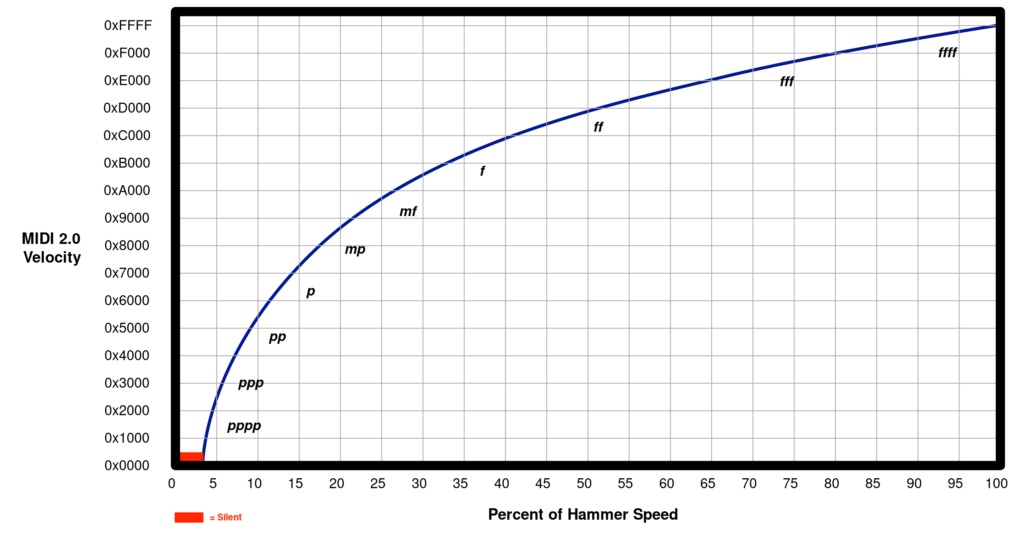
At the center of the Piano Profile is the Default Note On Velocity Curve — the single mechanism that does the most to make expressive exchange possible. The Profile defines a precise mapping between the musical dynamics a performer intends (from Silent and pppp up through ffff) and the MIDI velocity values used to represent them, in both the MIDI 1.0 and MIDI 2.0 protocols.
The example the specification offers makes the impact concrete: if a musician records a passage of one hundred notes all intended to be fortissimo, the average velocity of those Note On messages should land in the defined ff range. When that sequence is played back on a different piano that also conforms to the Profile, all those notes will still sound as fortissimo. The dynamic intent is carried by the data itself, not left to the accident of how a given device happens to interpret a number.
This is harder than it sounds. As the Implementation Guide explains, a piano’s response to key velocity involves both tone and volume, shaped by string vibration, case reverberation, soundboard resonance, mechanical action noise, and sympathetic resonance of undamped strings — and the balance of those factors shifts across the entire dynamic range.
The Profile’s genius is that it defines the target mapping of dynamics to velocity while leaving each manufacturer free to reach that target however best suits their instrument.
To help, MIDI 2.0’s high-resolution 16-bit velocity gives the curve far finer gradations than the 128 steps of classic MIDI, so the subtle differences between neighboring dynamic levels are no longer flattened.
Pedaling, Tuning, and the Details That Make a Piano a Piano
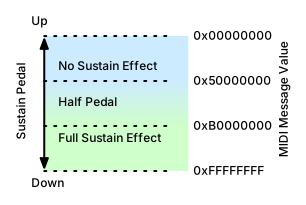
Expressive piano playing lives as much in the feet as in the hands, and the Profile treats pedaling with the seriousness it deserves. The sustain pedal (CC#64) is defined not merely as an on/off switch but as a continuous control with a defined half-pedal range, modeling the behavior of a damper pedal on a real acoustic piano. The specification describes exactly how deferred note-offs, the release stage of the envelope, and the “catching” of decaying notes when the pedal is re-engaged should behave — the physical subtleties that separate a mechanical rendering from a musical one. Devices can implement the full continuous response or, at minimum, a simple on/off, and two conforming instruments will still agree on what the pedal data means.
Beyond the sustain pedal, the Profile addresses the sostenuto pedal (CC#66), the una corda or soft pedal (CC#67), and a rich set of new Registered Controllers for piano-specific behavior:
- piano size and type
- scale tuning and temperament
- dynamic range
- lid position
- hammer hardness
- soundboard and sympathetic string resonance
- various mechanical noises such as damper noise, hammer thump, and key action noise.
It also recognizes the stretched tuning characteristic of real acoustic pianos and offers optional selection of temperaments such as Equal, Just Intonation, and Mean Tone.
For devices using the MIDI 2.0 protocol, optional per-note controllers can convey hammer position, damper position, and key position — data granular enough to support advanced reproducing pianos and research applications.
Built for Real-World Use Cases
The Profile was designed around the ways pianists and producers actually work today. It supports the classic digital piano and tone-generator pairing, but it reaches well beyond that into the connected, streaming, and education-driven realities of modern music-making. The specification explicitly targets:
- Online live broadcasting of piano performances
- Online lessons between a teacher and a student on different instruments
- MIDI streaming of recorded piano performances
- Music production and use of the Profile within DAWs
- Online sales of Standard MIDI Files
In each of these scenarios, the value is the same: a performance captured on one instrument can be trusted to sound as intended on another. A student practicing on a home digital piano can receive a lesson recorded on a concert grand and hear the teacher’s phrasing accurately. A composer selling Standard MIDI Files can be confident those files will render musically on a customer’s very different setup. And a live-streamed recital can reach listeners whose playback instruments were built by an entirely different manufacturer, on a different continent, in a different decade.
An Implementation Guide That Lowers the Barrier
A specification is only as strong as the ease with which engineers can implement it, which is why the accompanying Implementation Guide is such a significant part of this release. Where the specification defines the rules, the Implementation Guide offers the practical know-how: multiple methods for matching the Default Velocity Curve in both senders and receivers, formulas for converting between hammer speed and Note On velocity, guidance on pedal response, and advice on modeling noise parameters.
Crucially, it comes with a substantial library of reference files that developers can test against.
These include audio recordings of reference pianos playing individual notes at specific velocities, full musical performances — works by Brahms, Chopin, Liszt, and Burgmüller chosen to exercise the quieter, most demanding ends of the dynamic range — and matching Standard MIDI Files.
Developers can play the reference MIDI files through their own instruments and compare the result against the reference audio, giving them an objective, listen-and-verify path to conformance. The guide also points to open-source resources for USB MIDI 2.0, UMP handling, and MIDI-CI discovery and Profile configuration, further reducing the engineering lift.
Developer Tools from Kawai and MIDI9
To turn the Profile’s target definitions into something engineers can objectively test against, two of the contributing organizations have built and shared practical analysis tools, both documented in the Implementation Guide and available through the developer hub at midi2.dev.
Kawai’s SMF Analysis Tool — the “pianoprofile-velocity-checker” — helps developers tune a sender. It compares the Note On velocities of a chosen reference MIDI file against a new Standard MIDI File recorded on the device under test, then generates a CSV report showing the velocity differences across all 128 velocity values. A developer records a performance on their instrument, runs the comparison, and iterates on their keyboard’s velocity curve until it matches the Profile’s reference. The tool is offered as a Python program, with a Windows executable that can be built from GitHub via a link on midi2.dev.
MIDI9’s Audio Analysis Tool — “WaveFileAmplitudeAnalyzer,” developed by Dave Starkey of MIDI9 — helps developers tune a receiver. It is a script for Octave (the free, MATLAB-compatible interpreter) that analyzes the WAV audio produced when an instrument plays the Profile’s reference MIDI files. Flexible about bit depth and sample rate, it measures the peak amplitude of each note across the full range of dynamic levels and produces a PDF report that implementers can use to verify their conformance with the Default Velocity Curve.
Together, these two tools close the loop: Kawai’s checker validates what a piano sends, and MIDI9’s analyzer validates what a piano sounds like when it receives. Both, along with the Profile’s reference file library and future MIDI-CI Helper resources for DAW plugins, can be found at midi2.dev.

Together, these two tools close the loop: Kawai’s checker validates what a piano sends, and MIDI9’s analyzer validates what a piano sounds like when it receives. Both, along with the Profile’s reference file library and future MIDI-CI Helper resources for DAW plugins, can be found at midi2.dev.
What This Means for the Industry
The release of the Piano Profile marks a shift in what MIDI can promise for the piano. For four decades, MIDI has been a universal language for connecting instruments — but a language in which the same words could mean subtly different things to different speakers. The Piano Profile is the industry agreeing, at last, on a shared dialect for the piano: a common understanding of what dynamics mean, how pedals behave, and how the expressive DNA of a performance should be preserved as it moves between instruments.
For musicians, that means their playing will be represented more faithfully wherever it goes. For educators and students, it means lessons and practice materials that translate reliably across the gap between very different instruments. For content creators and the growing market in recorded and streamed piano performances, it means a dependable foundation for distribution. And for manufacturers, it means a rising tide: instruments that interoperate are more valuable to customers, and a shared standard lets each company keep competing on the thing that truly distinguishes them — the beauty and character of their sound.
That so many competitors chose to build this together speaks to a shared conviction that the expressive exchange of piano performance is bigger than any single brand. The MIDI-CI Profile for Piano v1.0 and its Implementation Guide are available now from the MIDI Association and AMEI. It is an invitation to the whole industry to make the piano, at last, speak with one voice about what a performance truly means.