

Music technology has always been about connection. MIDI connects instruments, computers, controllers, apps, and creative ideas. Now, MIDI may also be able to help connect more musicians to the information they need to create, perform, and produce music independently.
The MIDI Association’s Music Accessibility Standard Special Interest Group, or MASSIG, is exploring the possibilities for MIDI Assistive Text: standardized ways for MIDI devices to communicate useful text information to accessibility tools such as screen readers, text-to-speech engines, braille displays, and large-print interfaces.
The goal is simple but powerful. When a musician touches a control, changes a setting, selects a preset, opens a menu, or adjusts a parameter, the device should be able to tell the user what just happened in a way that can be spoken, displayed, translated, filtered, or adapted to that user’s needs.
Why Assistive Text Matters
For blind and low-vision musicians, many modern music products still present a major challenge. Hardware synthesizers, control surfaces, mixers, drum machines, effects processors, and music production tools often depend on visual displays, unlabeled controls, nested menus, or changing parameter assignments. A knob may control filter cutoff in one moment, reverb depth in another, and an entirely different software parameter when connected to a DAW.
For sighted users, that information may appear on a screen. For users who rely on assistive technology, the same information often remains inaccessible unless a manufacturer has built a custom solution. MIDI Assistive Text could provide a common method for delivering that information across devices, software, and operating systems.
This would not only benefit blind and low-vision users. Clear text feedback can also support music education, multilingual use, complex live performance setups, troubleshooting, and anyone working with devices that have small screens, dense menus, or multi-function controls.
A Growing Field of Accessibility Innovation
The idea of accessible music technology is not theoretical. A number of companies, developers, researchers, and musicians have already shown what is possible.
Hardware devices already sending accessibility-related text
Software adding accessibility information to MIDI 1 messages
- SurfaceReader (related to MIDI 1 accessibility within Kurzweil and Expert Sleepers products),
- NYU MIDI to Speech ‘synthaccess’ project
Other approaches
- Native Instruments’ NI Accessibility Helper app (including MIDI templates for external devices),
- Native Instruments NKS,
- MIDI Association / BetterMaker speech feedback tech demo,
- Arturia text-to-speech implementation,
- Softube Console 1’s screen reader functionality
These projects are important because they prove there is both a need and a path forward. The next question is whether MIDI can help create a more consistent, interoperable, and future-proof foundation for these kinds of solutions.
The Basic Concept Proposed: MIDI Devices Sending Useful Text
One possible model is a MIDI Text Receiver Utility running on a computer, mobile device, browser, or operating system. A MIDI-enabled hardware device could send text and metadata over MIDI. The utility would receive that information and pass it to the user’s preferred accessibility output, such as speech, braille, or large-print display.
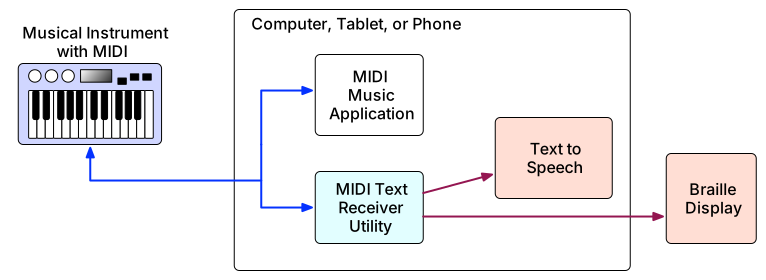
For example, a synthesizer might send text such as “Filter cutoff, 3012 hertz,” “Preset 24, warm pad,” or “Oscillator 2 waveform, sawtooth.” A mixer might send “Channel 5 mute on,” “Aux send 2, 40 percent,” or “Scene recalled.” A controller connected to a DAW might send or trigger spoken feedback such as “Track volume, piano, minus 6 dB.”
The key is that the text would travel through a standardized MIDI-based mechanism rather than requiring every manufacturer, operating system, and assistive technology provider to invent a separate solution.
Four Possible Sources of Assistive Text
The MIDI-CI Assistive Text proposal describes several possible mechanisms. These range from simple support for existing MIDI devices to more advanced MIDI 2.0 and MIDI-CI Profile-based solutions.
1. Interpreting Existing MIDI Messages
The simplest approach is for a utility application to interpret common MIDI messages that already exist. Notes, controllers, program changes, transport commands, and other standard MIDI messages could be translated into text. For example, a note message could be spoken as a note name, or a controller message could be described as a controller number and value.
This approach has an important advantage: it can work with MIDI devices that already exist. It does not require a firmware update or new device design. However, it provides only limited context, because a generic MIDI message does not always explain what a control actually means in a specific product or musical situation.
2. Using Device-Specific Data Sets
A second approach is to use a manufacturer-provided or community-created data file that explains how a specific device uses MIDI. For example, a data set could tell the utility that a particular control change message on a particular synthesizer represents “Attack Time” and that its range should be described from 0 to 10 seconds.
This could be especially useful for instruments with a “knob-per-function” design, where the relationship between a physical control and a function is relatively stable. It could also allow older devices to become more accessible without changing the device itself.
3. A MIDI-CI Profile for Assistive Text
The most powerful possibility is a dedicated MIDI-CI Profile for Assistive Text. MIDI-CI, or MIDI Capability Inquiry, allows devices to discover each other’s capabilities and agree on supported features. A Profile can define a specific set of rules for how devices communicate for a particular purpose.
With an Assistive Text Profile, a MIDI Text Receiver Utility could discover that a connected device supports assistive text, enable that Profile, ask what options are available, and then receive text messages from the device as the user interacts with it.
This could allow a hardware device to send meaningful text such as control names, values, menu items, preset names, note names, chord names, help prompts, or other information the manufacturer believes would help the user.
MIDI 2.0 provides message types that may be suitable for this kind of text transfer. Short words, phrases, labels, and values could potentially be sent using MIDI 2.0 Flex Data messages. Longer text, such as help content or tutorials, could potentially use other data transfer mechanisms. The exact technical design would need to be developed carefully with manufacturers, operating system providers, accessibility experts, and musicians with lived experience.
4. Using Other MIDI-CI Profiles
Assistive Text could also work alongside other MIDI-CI Profiles. For example, if a utility understands a Profile for piano, macro control, default control mapping, or DAW control, it may be able to provide more meaningful spoken or displayed feedback.
This is especially important for modern controllers whose controls change meaning depending on the selected track, plug-in, device, or focus area in a DAW. A knob may not have one fixed meaning. The DAW often knows what that knob is controlling at that moment. If the DAW can report the parameter name and value through a standardized Profile, the accessibility utility can provide much more useful feedback to the musician.
What Kind of Information Could Be Shared?
Assistive Text does not need to be limited to simple labels. Depending on the device and use case, MIDI Assistive Text could potentially describe many different kinds of musical and technical information:
- Control names, such as “Filter Cutoff,” “Pan,” or “Reverb Send”
- Control values, such as “21 percent,” “3012 hertz,” or “30 percent left”
- Preset names and program changes
- Menu items and menu navigation
- Track, channel, scene, or mixer information
- Note names, chord names, and educational feedback
- Device status, warnings, and confirmation messages
- Context-sensitive help or training information
- Language-specific labels and localized terminology
The best experience would also allow users to control how much information they hear or see. One user may want detailed descriptions while learning a device. Another may want short, fast feedback during a live performance. Assistive Text should be flexible enough to support different levels of verbosity, filtering, language preference, and device-specific customization.
Beyond Speech: Braille, Large Print, and Future Interfaces
Although text-to-speech is an obvious use case, MIDI Assistive Text should not be thought of as speech only. Once structured text is available to a receiver utility, it could be routed to many different assistive outputs.
- A screen reader could speak the information aloud.
- A refreshable braille display could present the text tactilely.
- A large-print overlay could display information for users with partial sight.
- A browser-based interface could expose the information through an accessible live region.
- Future assistive technologies could use the same text stream in ways that do not yet exist.
This is one of the strongest arguments for standardization. MIDI has lasted for decades because it separates musical intent from any one device or platform. MIDI Assistive Text could do something similar for accessibility information.
Glanceability, Training Mode, and Learning a Device
One important accessibility concept is “glanceability.” A sighted user can often glance at a screen or panel to learn the current state of a control without changing anything. Blind and low-vision users need an equivalent way to query information without accidentally changing a sound, mix, or performance setup.
A MIDI Assistive Text system could potentially allow a user to ask, “What is this control?” or “What is the current value?” without turning the knob or pressing the button in a way that changes the device state.
Another valuable idea is a training mode. In a training mode, a user could explore a device, touch controls, and hear what they do without sending performance or parameter changes. This could make complex hardware more learnable, more approachable, and safer to use in professional situations.
Why MIDI Is Well Suited to This Challenge
MIDI is already the shared language of electronic music instruments, controllers, computers, and apps. MIDI 2.0 adds new capabilities for richer communication, higher resolution, discovery, Profiles, and more structured data exchange. That makes MIDI a natural place to explore standardized accessibility communication between devices and assistive technologies.
A MIDI-based approach could help manufacturers avoid building isolated one-off solutions. It could help assistive technology developers support more devices. It could help operating system providers understand what kind of information music devices need to expose. Most importantly, it could help musicians get consistent, reliable feedback across a wider range of tools.
A Collaborative Effort
The MIDI Association’s exploration of Assistive Text is not just a technical project. It is a community conversation. It requires input from musicians with lived experience of blindness and partial sight, accessibility specialists, hardware manufacturers, software developers, DAW makers, operating system providers, educators, and standards experts.
The questions are not only “Can this be done?” but also “What information is actually useful?” “How should users control the amount of feedback?” “How should devices identify themselves?” “Where should text strings be stored?” “How should language support work?” and “What should be handled by MIDI messages versus the operating system or assistive application?”
Those questions are exactly why The MIDI Association and MASSIG are bringing people together. Accessibility works best when it is designed with disabled users, not simply for them.
Toward a More Accessible MIDI Future
Assistive Text in MIDI has the potential to make music technology more inclusive, more consistent, and more future-ready. It could help a synthesizer speak its parameters, a controller explain what it is controlling, a mixer report its channel state, or a DAW surface communicate changing context in real time.
For musicians who have been locked out of visual interfaces, this could mean more independence. For manufacturers, it could provide a clearer path to accessibility. For the broader MIDI community, it could extend MIDI’s long tradition of interoperability into a new and deeply important area.
MIDI has always helped instruments talk to each other. The next step may be helping instruments talk to musicians in ways every musician can use.